What is Logic in Kwyll?
One of the most important aspects of a game created with Kwyll is the ability to make objects, and other things, "do stuff", this is achieved with the logic system that is built into Kwyll. It is akin to the programming language in other game creation tools, but instead of being text based, it is visual, working by wiring together small items that do a relatively simple thing so that the whole does something more interesting.
These "small items" are called Nodes, Kwyll provides a basic set of Nodes that can be combined to do a variety of things, the process of "wiring" them together enables each Node to either pass data to another node, or to control the flow of the "program". Some of the Nodes are very simple, such as the Math Node, whose only job is to take in two values, perform a basic mathematical operation on them, add, subtract, multiply or divide, and then output the result. Others are more complex and perform a detailed operation in and of themselves based on the input and parameters.
Each node has an optional set of input and output Ports which can be of different types depending on their purpose, and a set of Parameters which configure the operation of the Node.
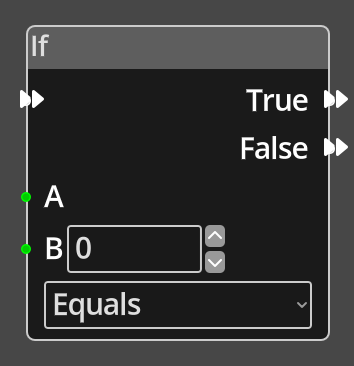 This
is a relatively simple Node that demonstrates most of the key features of a
logic Node. Here you can see on the left of the Node; 3 input Ports, one
with a double arrow at the top, and two green ones below. The double arrow port
is a Flow port, it is connected to other ports of the same type to control
the flow of execution. A Node will only have at most 1 Flow input port. The
green ports are data inputs, they provide integer numerical values to the node
from some other node. You'll notice that the "B" Port also has a numerical
input field alongside it, this is a parameter, in this particular case the
value that the Node uses can either be provided by another node via the
Port or specified as a fixed value in the parameter. In this example, you may
want to compare the input from another Node at A with either an input from
another Node or with a specific fixed value, 0 in this case. If you connect
another Node to the input Port B, the numerical input field will be hidden
as it is no longer necessary. On the right of the Node are the output ports,
in this example there are two Flow Ports, True and False. This Node is a
"branching" node, it will perform a comparison of the two values A and B using
the specified comparison type, for example "Equals". If the comparison results
in a true result, i.e. the two values are equal, the flow will follow whatever
is connected to the True output Port, if anything. If the comparison is
false, A and B are not equal, the flow will follow the False output Port.
Below the B port is another Parameter, in this case it is the type of
comparison to be made between A and B, equal, greater than, less than, etc.
This Parameter has no input port, so it can only have a fixed value chosen at
deisgn time. It is a means of configuring the operation of a Node in a way
that doesn't require input from another Node. To summarise, on this Node A
is a Port only, it requires an input wire to work, B is an input Port
or Parameter you can choose how this value is set depeneding upon your
needs, and the comparison type is a Parameter, you must choose this value
when editing and it cannot change at runtime.
This
is a relatively simple Node that demonstrates most of the key features of a
logic Node. Here you can see on the left of the Node; 3 input Ports, one
with a double arrow at the top, and two green ones below. The double arrow port
is a Flow port, it is connected to other ports of the same type to control
the flow of execution. A Node will only have at most 1 Flow input port. The
green ports are data inputs, they provide integer numerical values to the node
from some other node. You'll notice that the "B" Port also has a numerical
input field alongside it, this is a parameter, in this particular case the
value that the Node uses can either be provided by another node via the
Port or specified as a fixed value in the parameter. In this example, you may
want to compare the input from another Node at A with either an input from
another Node or with a specific fixed value, 0 in this case. If you connect
another Node to the input Port B, the numerical input field will be hidden
as it is no longer necessary. On the right of the Node are the output ports,
in this example there are two Flow Ports, True and False. This Node is a
"branching" node, it will perform a comparison of the two values A and B using
the specified comparison type, for example "Equals". If the comparison results
in a true result, i.e. the two values are equal, the flow will follow whatever
is connected to the True output Port, if anything. If the comparison is
false, A and B are not equal, the flow will follow the False output Port.
Below the B port is another Parameter, in this case it is the type of
comparison to be made between A and B, equal, greater than, less than, etc.
This Parameter has no input port, so it can only have a fixed value chosen at
deisgn time. It is a means of configuring the operation of a Node in a way
that doesn't require input from another Node. To summarise, on this Node A
is a Port only, it requires an input wire to work, B is an input Port
or Parameter you can choose how this value is set depeneding upon your
needs, and the comparison type is a Parameter, you must choose this value
when editing and it cannot change at runtime.
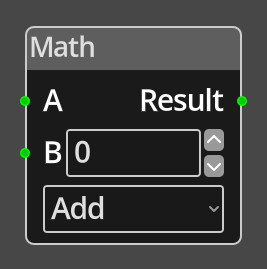 Some nodes
will have no Flow ports at all, this means the Node is not meant to be part
of the flow, but instead is meant to provide data to other nodes that are part
of the flow. These Nodes will have output data Ports that can be connected
to the input data Ports of other Nodes. When a Node that is part of a
flow has a wire connecting one of its input Ports to the output Port of
another Node, it will request the value from the other Node when it needs
it.
Some nodes
will have no Flow ports at all, this means the Node is not meant to be part
of the flow, but instead is meant to provide data to other nodes that are part
of the flow. These Nodes will have output data Ports that can be connected
to the input data Ports of other Nodes. When a Node that is part of a
flow has a wire connecting one of its input Ports to the output Port of
another Node, it will request the value from the other Node when it needs
it.
Nodes that are in a logic graph but not connected to a valid Flow or have output Ports that are not connected to anything, will not contribute to the program and will not be exported, but they will be saved with the game data should you need to access them in the future.
There are several types of data that can be passed between logic nodes in Kwyll, each with a unique colour for the port and wires that connect them.
- Number
- Shown as green, a signed 16 bit integer value, capable of representing anything between -32768 and 32767.
- Object
- Shown as blue, a reference to an object in the game, can be a Room object or a global object.
- Location
- Shown as magenta, a reference to a location on the map.
Typically a Port will only allow connections from other Ports that have a matching type. However, some nodes do allow any type to be connected. Most notable among these are the various variable access nodes. This is because it is possible in Kwyll to store any value type in a variable, not just a numeric value. The facility allows you to store references to objects and locations in variables for future reference.
When two Ports of different types are connected, which Kwyll will only allow where it is valid, the wire connecting them will fade from one colour to the other to indicate that the value being passed is different to what is normally expected but is valid all the same.
Editing Nodes
See the Logic Editor for a detailed explanation of the tools for creating and editing logic graphs in Kwyll.