Controller Input
Description
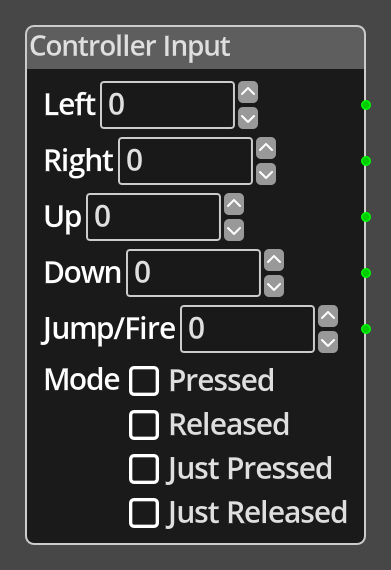 The Controller Input Node reports on the status of the configured controller
for left, right, up, down and jump/fire. This node will adapt to whatever has
been configured for the input method in your game, joystick, keyboard etc. The
node allows you to define which values to return when each input is activated,
defaulting to 1 for each, so that you can define the appropriate values for
your needs. For example, it might be common to use -1 for left and 1 for right,
to be used directly later in the graph as directions on the X axis to avoid
having to convert the input to a direction manually.
The Controller Input Node reports on the status of the configured controller
for left, right, up, down and jump/fire. This node will adapt to whatever has
been configured for the input method in your game, joystick, keyboard etc. The
node allows you to define which values to return when each input is activated,
defaulting to 1 for each, so that you can define the appropriate values for
your needs. For example, it might be common to use -1 for left and 1 for right,
to be used directly later in the graph as directions on the X axis to avoid
having to convert the input to a direction manually.
The controller reports the status in one of four modes, Pressed, Released, Just Pressed and Just Released. The Pressed and Released modes will report continuously while the input is in the appropriate state, either pressed or not pressed. The Just Pressed and Just Released will report only for the frame after the input changes to the appropriate state, pressed or released. For example, Just Pressed will report only once when the player presses the key or joystick control, commonly used for fire actions, it will not report again until the player releases that input and then activates it again.
Ports
- Left
- An integer output port that will report the result of checking the state of the left controller input based on the mode.
- Right
- An integer output port that will report the result of checking the state of the right controller input based on the mode.
- Up
- An integer output port that will report the result of checking the state of the up controller input based on the mode.
- Down
- An integer output port that will report the result of checking the state of the down controller input based on the mode.
- Jump/Fire
- An integer output port that will report the result of checking the state of the jump/fire controller input based on the mode.
Parameters
- Left
- A constant integer value that will be output on the Left port if the input check matches the mode for the left input.
- Right
- A constant integer value that will be output on the Right port if the input check matches the mode for the right input.
- Up
- A constant integer value that will be output on the Up port if the input check matches the mode for the up input.
- Down
- A constant integer value that will be output on the Down port if the input check matches the mode for the down input.
- Jump/Fire
- A constant integer value that will be output on the Jump/Fire port if the input check matches the mode for the jump/fire input.
- Mode
- Define the mode of operation between Pressed, Released, Just Pressed and Just Released. See above for an explanation of the difference between the modes.