Move Object
Description
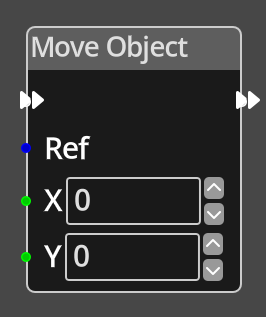 The Move Object Node takes input values X and Y that specify a position
to move the specified object to.
The Move Object Node takes input values X and Y that specify a position
to move the specified object to.
When moving an object using this node, if the object has the Collide Bg flag enabled, the node will check if the movement results in a collision with the background tilemap and prevent it, resulting in a different endpoint to the requested one.
The X and Y coordinates are in the coordinate system that is appropriate for the object being moved. If the object is a room object, it expects the position to be in room coordinates, if it is a map object, it expects it to be in map coordinates.
Ports
- Flow In
- In order for this node to perform its operation, it must be connected into an active flow using this input port. The flow will ultimately originate at a Trigger node but can come from the Flow Out port of any other flow node.
- Flow Out
- A node connected to the Flow Out port will be executed in sequence following the completion of this node's operation.
- Ref
- An object reference port that provides a reference to the object to check. If this is not connected, and the logic is on an object, the current object will be used.
- X
- An integer input port used to provide the X value of the new position.
- Y
- An integer input port used to provide the Y value of the new positio.
Parameters
- X
- A constant integer value for the X coordinate, used when the X port is not connected.
- Y
- A constant integer value for the Y coordinate, used when the Y port is not connected.