Set Object Colour
Description
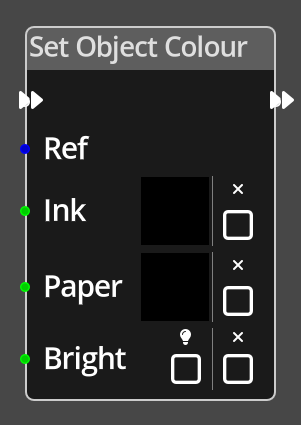 The Set Object Colour Node sets the colour information for the given object.
The Set Object Colour Node is a little different to many other nodes in the way it presents parameters, this is due to the fact that it can be used to modify only certain properties of the object colour. The primary difference in the parameters is the inclusion of an additional checkbox for each with a small X above it, this check box is used to indicate that the operation should ignore that property altogether. For example, selecting the X checkbox on the Ink property would ensure that the operation makes no changes at all to the ink colour of the object.
Ports
- Flow In
- In order for this node to perform its operation, it must be connected into an active flow using this input port. The flow will ultimately originate at a Trigger node but can come from the Flow Out port of any other flow node.
- Flow Out
- A node connected to the Flow Out port will be executed in sequence following the completion of this node's operation.
- Ref
- An object reference port that provides a reference to the object to change the colours of. If not connected, and the logic is on an object, the current object will be used.
- Ink
- An integer input port used to provide the ink colour index.
- Paper
- An integer input port used to provide the paper colour index.
- Bright
- An integer input port used to provide the brightness setting, 0 is non-bright, any other value is bright.
Parameters
- Ink
- A colour selector to choose visually the ink colour to use for the object. The checkbox with the X above indicates that the ink colour of the object should not be changed.
- Paper
- A colour selector to choose visually the paper colour to use for the object. The checkbox with the X above indicates that the paper colour of the object should not be changed.
- Bright
- A checkbox to select whether the object will be bright or not. The checkbox with the X above indicates that the brightness of the object should not be changed.