Set Object Flags
Description
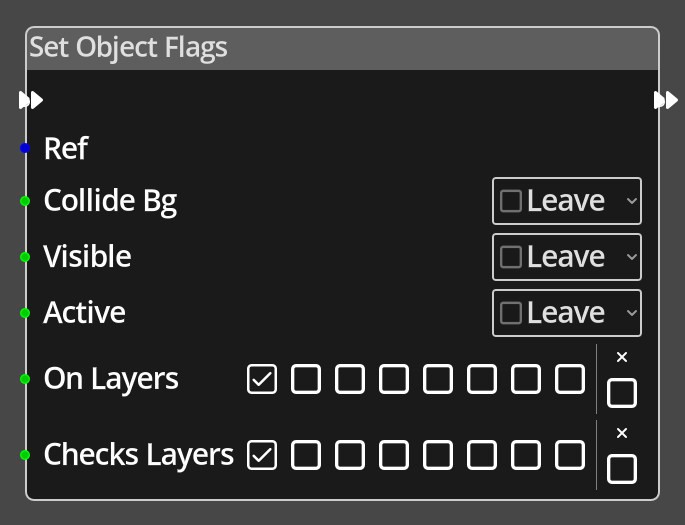 The Set Object Flags Node is used to modify the flags on a given object.
It can modify the flags that control whether the object registers intersection
with other objects during moving, whether the object collides with the bacground
tilemap or not, whether it is visible, and whether it is active.
The Set Object Flags Node is used to modify the flags on a given object.
It can modify the flags that control whether the object registers intersection
with other objects during moving, whether the object collides with the bacground
tilemap or not, whether it is visible, and whether it is active.
The Set Object Flags Node is slightly different to many nodes in regards to how the parameters are set. This is due to the fact that it can be used to only affect certain flags, and leave others unchanged. To accommodate this, each flag is represented by a "three state checkbox". The three states are "on", "off", and "leave". If any are set to Leave, that flag will not be modified from its current state.
Ports
- Flow In
- In order for this node to perform its operation, it must be connected into an active flow using this input port. The flow will ultimately originate at a Trigger node but can come from the Flow Out port of any other flow node.
- Flow Out
- A node connected to the Flow Out port will be executed in sequence following the completion of this node's operation.
- Ref
- An object reference port that provides a reference to the object to change ths flags of. If not connected, and the logic is on an object, the current object will be used.
- Collide Bg
- An integer input port used to provide the value of the Collide Bg flag, 0 is off, any other value is on.
- Visible
- An integer input port used to provide the value of the Visible flag, 0 is off, any other value is on.
- Active
- An integer input port used to provide the value of the Active flag, 0 is off, any other value is on.
- On Layers
- A bit field representing the intersection layers this object belongs to, bits 0 to 7 represent layers 0 to 7.
- Checks Layers
- A bit field representing the intersection layers this object will check for intersections with, bits 0 to 7 represent layers 0 to 7.
Parameters
- Intersect Objects
- A constant value for the Intersect Objects flag, used when the Intersect Objects port is not connected. If the value is Leave, the flag state will not be changed.
- Collide Bg
- A constant value for the Collide Bg flag, used when the Collide Bg port is not connected. If the value is Leave, the flag state will not be changed.
- Visible
- A constant value for the Visible flag, used when the Visible port is not connected. If the value is Leave, the flag state will not be changed.
- Active
- A constant value for the Active flag, used when the Active port is not connected. If the value is Leave, the flag state will not be changed.
- Ignore On Layers (checkbox labelled 'x' next to the On Layers settings)
- If this flag is set, no changes will be made to the "On Layers" property of the object.
- Ignore Checks Layers (checkbox labelled 'x' next to the Checks Layers settings)
- If this flag is set, no changes will be made to the "Checks Layers" property of the object.