Sprite Animation
Description
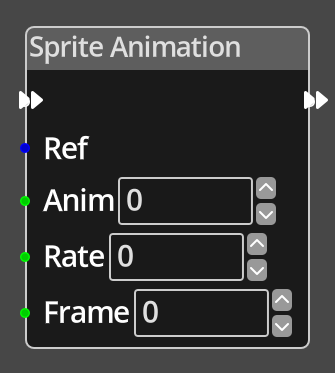 The Sprite Animation Node is used to modify the settings for any
sprite animations created on an object instance. It can optionally
change the current animation, the rate and the frame in the current or new animation.
The Sprite Animation Node is used to modify the settings for any
sprite animations created on an object instance. It can optionally
change the current animation, the rate and the frame in the current or new animation.
Ports
- Flow In
- In order for this node to perform its operation, it must be connected into an active flow using this input port. The flow will ultimately originate at a Trigger node but can come from the Flow Out port of any other flow node.
- Flow Out
- A node connected to the Flow Out port will be executed in sequence following the completion of this node's operation.
- Ref
- An object reference port that provides a reference to the object to check. If this is not connected, and the logic is on an object, the current object will be used.
- Anim
- An integer port that provides the index of the animation to switch to. If the value is -1, the current animation is not changed.
- Rate
- An integer port that provides the requested animation rate for the sprite animation. If the value is -1, the rate is not modified. A value of 0 effectively stops the sprite animation from playing. The rate is a delay between changing animation frame in game frames. If the game is successfully running at 50fps, a value of 50 will make the animation play at one frame per second.
- Frame
- An integer port that provides the requested frame number on the current animation. If the value is -1, the frame is not modified, unless a change in animation makes the current frame number invalid.
Parameters
- Anim
- A constant integer value for the animation index, used when the Anim port is not connected.
- Rate
- A constant integer value for the animation rate, used when the Rate port is not connected.
- Frame
- A constant integer value for the animation frame, used when the Frame port is not connected.