Locations
Just as with Object Types, a Room Type does not contribute to the game itself, it just defines what a room looks like and can do. A location is the equivalent of an Object Instance, it is the instance of a Room Type in the game. Locations are created by dropping room types onto the Map in the Map Editor.
Changing a variable value in room logic changes the value on the particular location that is running the logic. For example, imagine you have a forest Room Type with some logic that includes a variable "south door", which is 1 if the south door is closed, and 0 if it is open, and in the logic for that Room Type you paste a brush in the south doorway, an open door if it is open, a closed door if it is closed. If you create two locations using that Room Type, each location will have its own value for the "south door" variable, when something happens to open the door in the first of those two locations, the value of the "south door" variable is updated, and the shared logic changes the display of the door, it is modifying only the value stored on the first location, the value on the second location is not changed. Similarly, when the player opens the south door in the second location, the "south door" variable on the second location is changed, and the first location’s "south door" value remains unchanged.
Location Properties
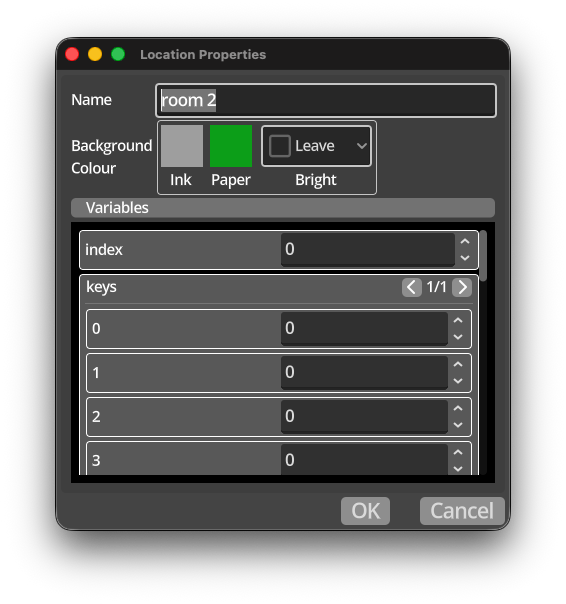
Each location has a number of properties that influence how the location works in the game. These properties are unique to each location, unlike the shared properties that all instances of a particuler Room Type have such as tile map and logic.
-
Name - a meaningful name for the specific location on the map.
-
Background Colour - allows you to define the default background of a location in terms of ink, paper and brightness. Each property can be specified, or left to the default. The method of identifying the default colour is described in Colour Priority.
-
Variables - this area a will show a list of the variable names that are defined on the Room Type for this location. It allows you to set the values of those variables at the start of the game. This is particularly useful to enable configuration of locations that share a common room type, but have specific behaviour per instance. A good example of using this facility of Kwyll is to define one room type, add a number of variables to the logic to choose the layout of the room, such as which sides have doors, what type of walls to use, etc. Then, in the room logic, use those variable values to change the appearance of the room. This way, you can place multiple instances of the same room type on the map, tweak the variables in the location properties and get many different locations from a single room type. The advantage of this is each location is relatively lightweight in terms of memory use, requiring only the unique location properties such as variable values, allowing you to define a larger map very efficiently.