Set Tile Colour
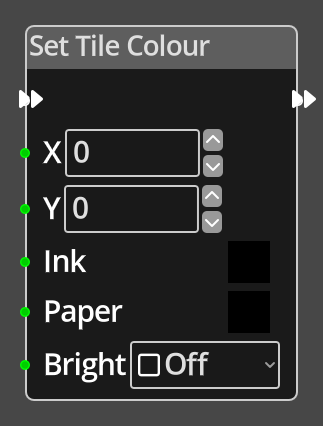
The Set Tile Colour Node is used to set the current tile type drawn into a given cell on the Tilemap in the current room.
Ports
- Flow In
-
In order for this node to perform its operation, it must be connected into an active flow using this input port. The flow will ultimately originate at a Trigger node but can come from the Flow Out port of any other flow node.
- Flow Out
-
A node connected to the Flow Out port will be executed in sequence following the completion of this node’s operation.
- X
-
An integer input port used to provide the X value of the tile coordinate.
- Y
-
An integer input port used to provide the Y value of the tile coordinate.
- Ink
-
An integer input port used to provide ink colour to apply to the given cell, see Colour. This can be set to "X" to leave the current tile ink unaltered.
- Paper
-
An integer input port used to provide paper colour to apply to the given cell, see Colour. This can be set to "X" to leave the current tile paper unaltered.
- Bright
-
An integer input port used to provide paper colour to apply to the given cell, see Colour, a 0 value is not bright, any non-zero value is bright. This can be set to "Leave" to leave the current tile brightness unaltered.
Parameters
- X
-
A constant integer value for the X coordinate, used when the X port is not connected.
- Y
-
A constant integer value for the Y coordinate, used when the Y port is not connected.
- Ink
-
A constant integer value for the the ink colour, used when the Ink port is not connected.
- Paper
-
A constant integer value for the the paper colour, used when the Paper port is not connected.
- Bright
-
A constant integer value for the brightness setting to assign at the specified coordinates, used when the Bright port is not connected.