Is On Screen?
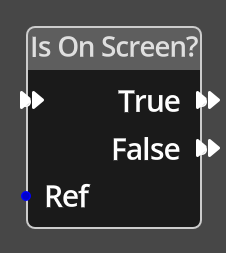
The Is On Screen Node takes a reference to an object and checks if its position puts it in a potentially visible place in the game window. It will continue executing in one of the True or False paths depending on the outcome of the test.
| Potentially visible means in a location that is within the bounds of the game window, the object could be on screen, but not visible if the visible flag is not set. |
Ports
- Flow In
-
In order for this node to perform its operation, it must be connected into an active flow using this input port. The flow will ultimately originate at a Trigger node but can come from the Flow Out port of any other flow node.
- Ref
-
An object reference port that provides a reference to the object to check. If this is not connected, and the logic is on an object, the current object will be used.
- True
-
A node connected to the True port will be executed in sequence if the object is in a potentially visible position in the window.
- False
-
A node connected to the False port will be executed in sequence if the object is not in a potentially visible position in the window.