Logic Execution Order
Kwyll runs logic in a fixed order. The Preview simulator and the exported Spectrum engine use the same trigger sequence, so the order below is the one to design around when two pieces of logic depend on each other.
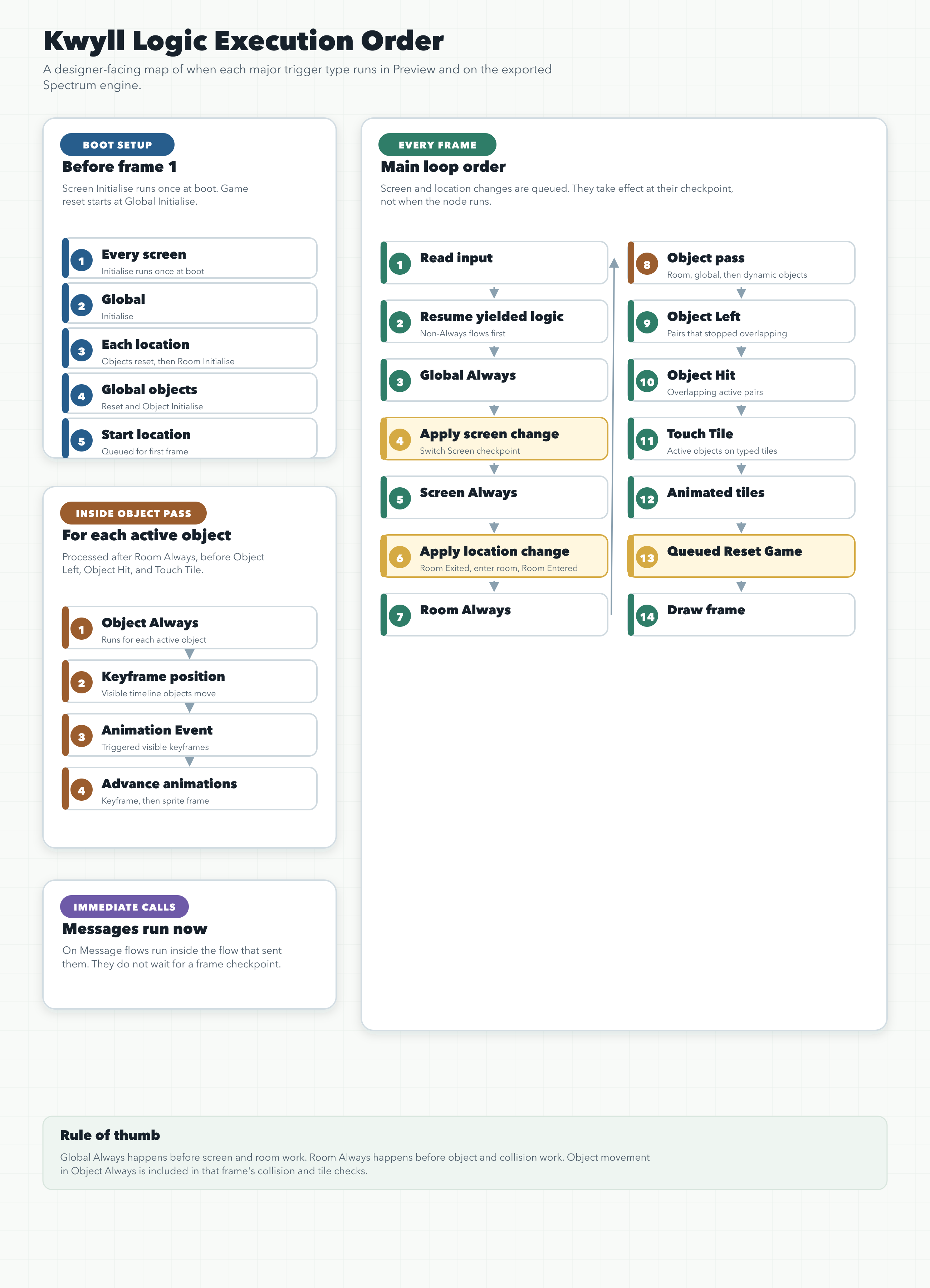
Within a single logic graph, multiple trigger nodes of the same type are run by their Order value. Lower values run first. If two trigger nodes have the same Order, do not rely on which one runs first.
When the game starts
When a game first boots, Kwyll runs screen setup once, then resets the game state ready for the first frame.
-
Every screen runs its Initialise logic, in screen list order.
-
Any logic that was suspended by Yield during screen setup is cancelled before play begins.
-
Global Initialise logic runs.
-
Each map location is reset in map order.
-
For each location, its room objects are reset to their starting state. Active room objects run Object Initialise logic in room object order.
-
The location runs Room Initialise logic.
-
Global map objects are reset. Active global objects run Object Initialise logic in map object order.
-
The start location is queued. It is entered at the location-change checkpoint on the first frame.
Screen Initialise is a boot-time trigger. It does not run when you use Switch Screen, and it does not run when the game is reset during play.
Each frame
Each update of the game runs in this order:
-
Input state is read.
-
Suspended non-Always logic resumes. This is logic that previously yielded from an event, message, or other non-Always trigger.
-
Global Always logic runs.
-
Pending screen changes are applied. This is where Switch Screen takes effect if it was requested before this point in the frame.
-
Current screen Always logic runs.
-
If the current screen is a game screen, pending location changes are applied. This is where Change Location and Go To Location At take effect if they were requested before this point in the frame.
-
If a previous location is being left, that location runs Room Exited. Suspended logic owned by the old location and its room objects is then cancelled.
-
If a new location is being entered, its room is drawn and its room objects are created. The new location then runs Room Entered.
-
Current location Always logic runs.
-
Active objects are processed.
-
Object Left triggers run for tracked object pairs that are no longer overlapping.
-
Object Hit triggers run for overlapping active object pairs.
-
Touch Tile triggers run for active objects touching typed tiles.
-
Animated tiles advance.
-
A queued Reset Game runs.
-
The frame is drawn.
If a screen or location change is requested after its checkpoint has already passed, it waits until the same checkpoint on the next frame.
Object processing
During the active object step, objects are processed in three groups:
-
Current room objects, from the last object in the room list back to the first.
-
Global map objects, from the last object in the map object list back to the first.
-
Dynamic objects, from the most recently allocated dynamic slot back to the first.
For each active object in that order:
-
Object Always logic runs.
-
If the object is visible and has a current keyframe animation, its timeline position is applied.
-
If the visible object’s current keyframe has a trigger event, Animation Event runs.
-
The keyframe animation advances to the next frame.
-
The sprite animation advances.
Object collision and tile triggers happen after every active object’s Always and animation work for the frame has finished.
Messages and custom triggers
Message nodes run their target On Message logic immediately. They do not wait for the next frame checkpoint.
For example, if an Object Always flow sends a message to Global Logic, the matching Global On Message flow runs right there before the object flow continues. The same rule applies to messages sent to screens, locations, and objects.
Yielding logic
Logic that uses Yield is resumed in a predictable place:
-
Yielded non-Always logic resumes near the start of the next frame, before Global Always.
-
Yielded Always logic resumes the next time that same Always trigger is reached.
-
If a screen, location, or object is removed or reset, suspended logic owned by it is cancelled.
Use this when you want a flow to continue over several frames. Do not use Yield inside subgraphs; subgraphs are run as part of their caller and cannot suspend independently.
Practical rules
Use Global Always for logic that must happen before screen or room work in the same frame.
Use Screen Always for logic that should happen after a pending screen change, but before location and object logic.
Use Room Always for logic that should happen after a pending location change, but before object logic and collision checks.
Use Object Always for movement and state changes that should be included in the same frame’s Object Hit, Object Left, and Touch Tile checks.
Remember that Switch Screen and Change Location are queued. If an object asks to change location during Object Always, the current frame finishes its object, collision, tile, animated-tile, and reset steps first. The new location is entered on the next frame.